

When someone you love passes away, the days that follow are filled with difficult decisions, quiet grief, and endless tasks. Putting together a memorial presentation might feel like just another task on a long list, but it often ends up being the most comforting thing you do. Saying goodbye brings deep personal grief. Pictures hold our most precious memories, so a tribute video gathers these moments. It unites family members in sorrow and later you can watch it together quietly.
Reliable funeral slideshow software makes editing simple. The creative process offers gentle comfort. You build something worthy of them. It preserves a meaningful family story. Taking the time to create such a tribute video gives everyone in the room a chance to exhale, look back, and remember the life behind the loss.
Gather Your Materials
Start by collecting all visual materials. Look through old printed family albums. Gather loose prints stored in boxes. Ask relatives to share favorite snapshots. Cousins often have forgotten baby pictures. Don’t worry if people send slightly crumpled prints. Set up a shared digital folder where relatives can drop photos without technical trouble.
Scan paper photos using your phone. Flatbed scanners also give great results. Don’t forget to wipe dusty glass before scanning pictures. Name every scan clearly right away. A simple label like “1974_SummerTrip” will save you endless searching later on.
Collect digital files from personal phones. Check social media pages for memories, look through cameras and old computers. Save everything into one main folder. Keeping files in one single location keeps you calm when time is short.
Pick a few meaningful musical tracks. Instrumental pieces work best for services. Acoustic guitar creates a warm mood. Classical piano feels peaceful and dignified. Pick tunes your loved one liked. Keep the melodies soft and calm. Background music should wrap around the memories rather than overpower them.
Write down key dates and names. Note milestones, hometowns, and proud moments. Short captions help older guests remember. It also helps younger family members recognize relatives they never got to meet.
Select Meaningful Photos
Quality matters much more than quantity. Aim for fifty to seventy pictures. This keeps the viewing time manageable. Ten minutes is usually just right. Longer presentations can tire your guests. Sitting on chapel chairs for too long can test anyone’s stamina, especially when emotions run high.
Organize the selected pictures by date. Begin with early childhood and youth. Show school days and proud graduations. Add wedding days and early jobs. Include scenes of raising young children. Move toward travels and family reunions. Following a person’s life in chronological order helps everyone trace the full journey they walked.
Choose portraits that capture their personality. Pick photos showing genuine, warm smiles. Candid snapshots often feel most real. Include photos with friends and pets. Show their hobbies, garden, or crafts. Did they love fishing at dawn or baking with flour on their apron? Show those moments. Imperfect, spontaneous frames are usually the ones that bring a knowing smile from the room.
Avoid blurry or poorly lit images. Skip photos where faces look obscured. Make sure every close relative appears. Balance goofy smiles with quiet moments. Treat every image with tender care. Be thoughtful about including everyone who cared for them, ensuring that the presentation feels inclusive and peaceful for everyone present.

Choose the Tone and Music
Music guides the room’s emotional mood. Soft melodies help guests process feelings. Loud tracks can feel too distracting. Gentle acoustic songs set respectful atmospheres. Ambient piano pieces bring quiet peace. Music works on a subtle level, softening the edges of a somber gathering.
Select two or three fitting tracks. Fade music gently between picture sections. Match songs to the photo eras. An early song fits youthful photos. A later melody fits mature years. That natural shift in tempo mirrors the passing decades without drawing unnecessary attention to itself.
Respect the person’s own musical taste. A classic hymn honors devout lives. Soft folk songs honor nature lovers. Keep the audio volume modest throughout. Visitors often want to speak quietly. During a visitation or wake, relatives will hug and share memories. The audio should never drown out those quiet conversations.
Assemble Your Slideshow Video
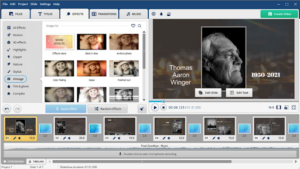
Open your chosen program on the desktop. Import your collected photos and songs, then place the pictures in timeline order. Take a moment to step back and look at the sequence as a whole.
Set slide durations to four seconds. Five seconds gives guests proper pause.
Keep your slide transitions very simple. Basic crossfades look clean and natural. Avoid flashy spins or bouncy animations. Subtle motion effects work well too. Slowly zoom in on key faces. A gentle pan across an old black-and-white group portrait can bring an antique print to life.
Add captions only where truly needed. Write full names and wedding years. Include birthdates and special milestone locations. Use clean fonts that people read. White text with shadows stays visible. High-contrast lettering ensures that even guests sitting at the back of the room can read the years clearly.
Play the full video from the start. Check for typos in every caption. Make sure songs fade out softly. Invite a close sibling to watch. Fresh eyes catch little forgotten details. They might notice that a date is off or that a favorite cousin was accidentally omitted.
Export and Share the Tribute
Export the video in high definition. Standard MP4 files work on everything. Save files to two flash drives. Label both USB sticks very clearly. It is also wise to keep a copy right on your laptop’s hard drive so you do not rely solely on thumb drives.
Contact the venue coordinators beforehand. Check what screens they provide onsite. Test the projector before guests arrive. Plug your laptop into their system. Listen to the room’s sound speakers. Check that video aspect ratios match. Modern displays use a widescreen 16:9 format, so make sure older square photos don’t end up stretched or awkwardly cropped around the edges.
Bring backup cables for your laptop. Test everything thirty minutes before service. Prepared plans remove unnecessary funeral stress. Knowing the technical setup is solid lets you sit with your family and experience the service without anxiety.
Afterward, share files with distant relatives. Upload the video to private storage and send links through email to family. Burn DVD copies for aging grandparents. Save the master file forever safely.
This memorial remains a lasting heirloom. Future generations will watch their story. Long after the service ends, this collection of moving memories will preserve their smile and the love they shared with everyone around them.